
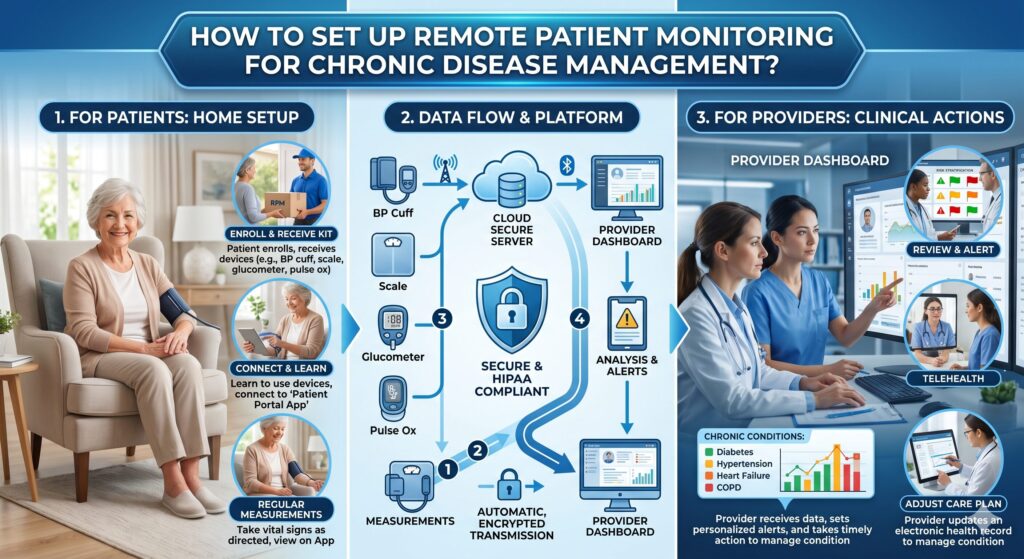
How to Set Up Remote Patient Monitoring for Chronic Disease Management?

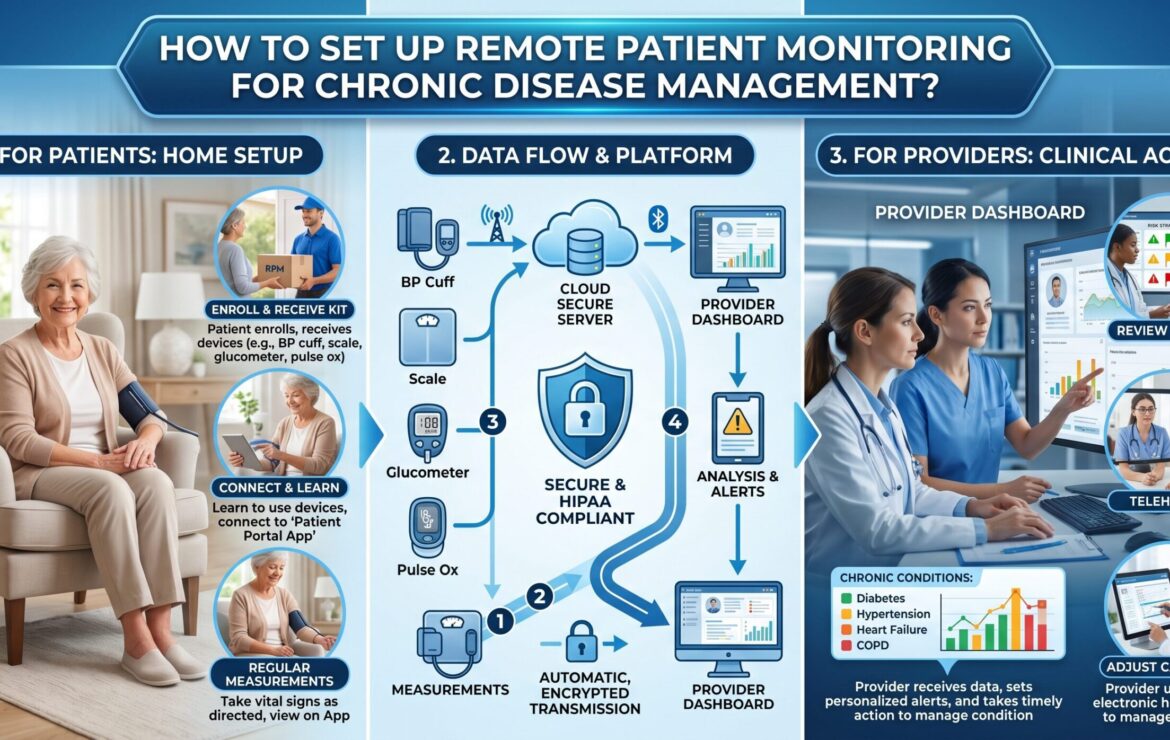
Chronic diseases like diabetes, hypertension, and heart conditions need regular monitoring, not just occasional clinic visits. This is where remote patient monitoring makes a real difference. It allows doctors to track patient health in real time while patients stay at home, follow their routine, and avoid frequent hospital trips.
Setting up remote patient monitoring for chronic disease management may sound complex, but it is actually a practical step for clinics and healthcare providers looking to improve patient outcomes and reduce workload. With the right tools, clear workflows, and a simple setup process, you can start monitoring vital signs, catch early warning signs, and provide better care without adding extra pressure on your team.
In this guide, you will learn how to set up remote patient monitoring step by step, what tools you need, and how to make it work smoothly for both your patients and your practice.
What Is Remote Patient Monitoring?
Remote patient monitoring uses wearable devices, sensors, and apps to collect patient data outside clinical settings. This data transmits to healthcare teams for analysis, enabling proactive chronic disease management.
RPM shifted from reactive to preventive care, especially post-COVID, with over 50 million Americans using some form of RPM in early 2026.
Why Choose RPM for Chronic Disease Management?
Chronic diseases affect 60% of U.S. adults, driving $4.1 trillion in annual costs. RPM cuts hospital readmissions and boosts adherence. Additionally:
- Reduces readmissions by 76% per University of Pittsburgh studies.
- Market grows at 12.7% CAGR, reaching $57 billion by 2030.
- Improves patient satisfaction to 90-92%.
What Devices Do You Need for Remote Patient Monitoring Setup?
Select FDA-cleared devices for accuracy and compliance.
| Device Type | Chronic Conditions | Key Features | Examples |
| Blood Pressure Monitors | Hypertension, heart failure | Cellular connectivity, auto-sync | Omron, Withings |
| Glucometers | Diabetes | Continuous glucose monitoring (CGM) | Dexcom G7, Freestyle Libre |
| Pulse Oximeters & Scales | COPD, CHF | Weight trends, oxygen levels | Nonin, Withings Body+ |
| Wearables | Multi-parameter | Heart rate, activity tracking | Fitbit, Apple Watch (HIPAA-enabled) |
Start with 2-3 devices per patient profile.
How Do You Select the Right RPM Platform?
Choose platforms with EHR integration to avoid silos (an underrated gap).
Your RPM partners offer
– Alerts to cut fatigue.
– HIPAA-compliant dashboards.
– Scalable for clinic managers.
Look for 24/7 support.
What Steps Follow Patient Identification?
Screen high-risk patients via EHR flags.
- Diabetes (HbA1c >8%)
- Hypertension (BP >140/90)
- Heart failure (recent admission)
- COPD (frequent exacerbations)
Use risk scores like CHA2DS2-VASc. Aim for 20-30% clinic population.
How Do You Onboard Patients Effectively?
Patient education prevents 50% dropout rates. You can overcome this by following these practices:
- Conduct 15-min virtual demo.
- Set daily check-in reminders.
- Provide multilingual guides/videos.
- Involve caregivers for an 85% adherence boost.
What Training Do Clinic Staff Need?
Train on dashboards, alerts, and protocols (1-hour sessions).
- Alert triage: Prioritize critical vs. trends.
- Data review: 5 mins/patient daily.
- Documentation for billing (CPT 99453-99458).
Address pain points: Overwhelmed support and poor EHR sync frustrate 20% users.
How Do You Integrate Remote Patient Monitoring with EHR Systems?
Seamless integration is key; fragmented data plagues 30% setups.
- Use FHIR APIs for Cerner/Epic.
- Automate vitals import.
- Test bi-directional sync.
What Alert Protocols Ensure Timely Interventions?
Custom thresholds prevent fatigue.
| Condition | Threshold Example | Action |
| Hypertension | SBP >160 | Call within 1 hour |
| Hypoglycemia | Glucose <70 | Text patient, escalate |
| Weight gain | +3kg/week | Review HF meds |
| Low O2 | SpO2 <92% | ER eval |
How Do You Ensure HIPAA Compliance and Data Security?
- Encrypt transmissions (AES-256).
- Annual audits, BAAs with vendors.
- Patient consent via portal.
Breaches cost $10M on average.
What Billing Codes Maximize RPM Revenue?
2026 CMS codes unchanged:
| Code | Description | Reimbursement |
| 99453 | Setup/review (monthly) | $19 |
| 99454 | Device supply/data | $56/month |
| 99457 | 20-min review | $50 |
| 99458 | Add’l 20-min | $41 |
What Risks and Contraindications Exist in Remote patient monitoring?
Risks:
- Data overload/alert fatigue (missed anomalies).
- Tech barriers for elderly (digital literacy).
- Low adherence (50% non-use).
- False positives (5-10% alerts).
Contraindications:
- No smartphone/home WiFi.
- Cognitive impairment (dementia).
- Acute instability needing in-person.
Mitigate with hybrid models.
What Real User Pain Points Should You Avoid?
Slow support overwhelms teams.
Setup complexity wastes hours.
API limits hit scaling clinics.
EHR silos fragment data.
Our solution: Instant alerts, seamless integrations.
How Does RPM Impact Chronic Outcomes?
Outcomes include:
92% satisfaction.
76% readmission drop.
BP control improves 20%.
If you are looking to set up RPM for your service, book a call with us today.
FAQs
What is the cost to set up RPM for a clinic?
Initial: $5K devices/training; monthly $50/patient. ROI in 6 months via billing.
How long does it take to see RPM results?
30-90 days for adherence gains; 6 months for readmission cuts.
Can RPM replace in-person visits?
No, complements for chronic stability.
What if patients resist RPM devices?
Use incentives, family involvement; 90% adopt with education.
Is RPM covered by Medicare in 2026?
Yes, expanded for chronic care.
Related posts